Changes coming to advisor notifications
Submitted by Krishan on February 14, 2020 - 2:26pm
 Printer-friendly version
 PDF version
| Read Online |
Subscribe to Account Highlights for transfer out notifications |
|
As of Saturday, February 15, B2B Bank Dealer Services will be using Advisor Access Account Highlights exclusively to notify advisors of transfer out requests. The online Transfer Out report under the Transfers category will include both full and partial requests and will be updated as transfer out requests are received. As of that date, transfer out notifications will no longer be available by fax.
In order to view transfer out requests, you will need an Advisor Access User ID and password. If you are not already a user, please contact B2B Bank Client Services to register at 1-800-263-8349. |
What does this mean for you?
If you have not already done so, you will need to subscribe to Advisor Access Account Highlights, which will include a report of accounts with active transfer out requests as of the open of that business day.
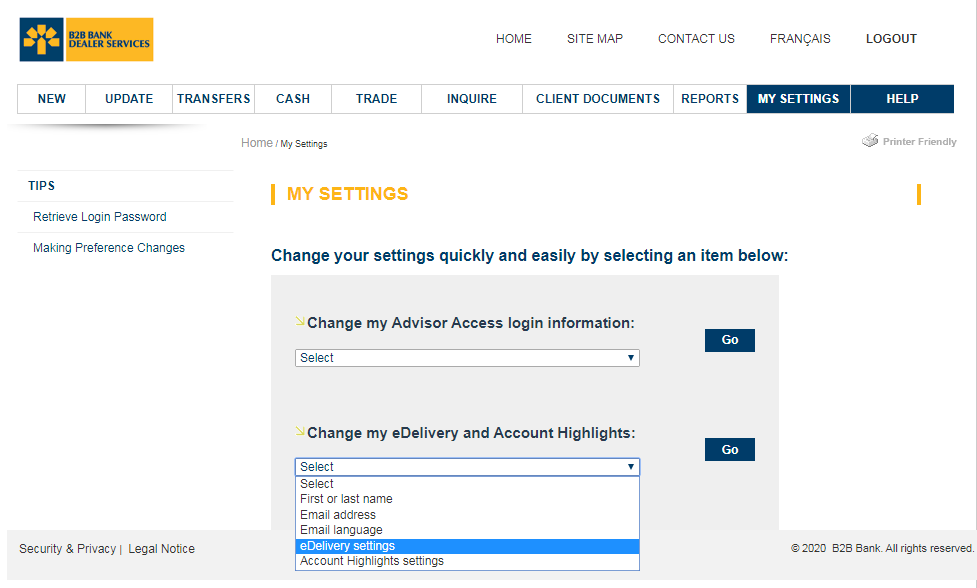
Once you have logged into Advisor Access, select My Settings. Under the Change my eDelivery and Account Highlights, select eDelivery settings.
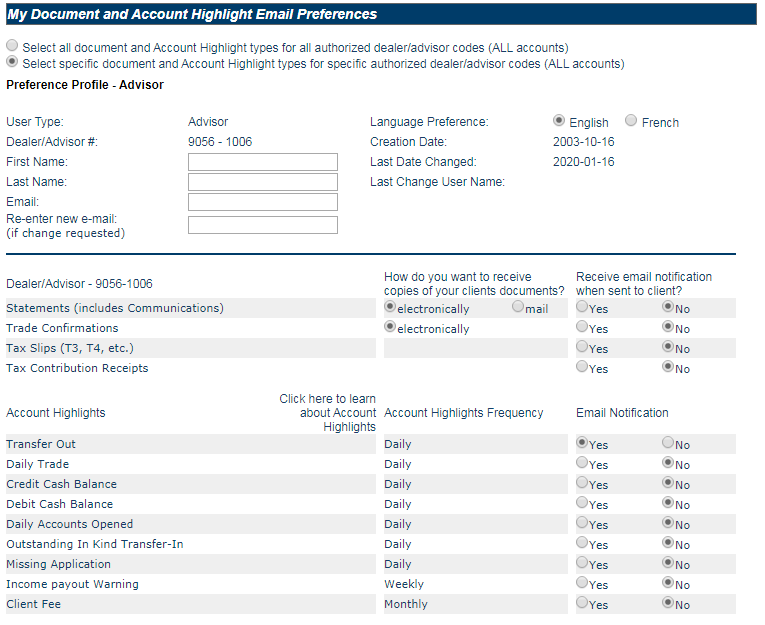
Select Yes for daily Transfer Out email notifications.
You can also check on your transfer out report at any time, in the Reports tab.
If you require any further assistance, please contact B2B Bank Client Services at 1-800-263-8349. |